Using Postman: Difference between revisions
Jump to navigation
Jump to search
Created page with "= Connecting Postman to API Gateway = # AWS API Gateway: click name of service api" |
No edit summary |
||
| Line 1: | Line 1: | ||
= Connecting Postman to API Gateway = | = Connecting Postman to API Gateway = | ||
== Connect API to Post man. == | |||
# AWS API Gateway: click name of service api | |||
#: [[File:Screenshot from 2022-10-10 10-07-58.png]] | |||
# Click stage /Test | |||
#: [[File:Screenshot from 2022-10-10 10-33-30.png]] | |||
#* and click export choose ..”Export as Swagger+Postman Extensions” copy code JSON | |||
#: [[File:Screenshot from 2022-10-10 10-38-08.png]] | |||
# Go to postman and paste in import/ Raw text/ continue. | |||
#:* a. [[File:Screenshot from 2022-10-10 10-41-59.png]] | |||
#:* b. [[File:Screenshot from 2022-10-10 10-43-05.png]] | |||
# Now My Workspace connect to Api finished. | |||
#: [[File:Screenshot from 2022-10-10 10-46-07.png]] | |||
== Access Token == | |||
web interface: https://d1gix48j5w3eur.cloudfront.net/buying | |||
# Navbar > Sign in using mock account (suggested), if you signup with new user will get default role in basicUser, that mean you NOT allow to access all functions. | |||
#:[[File:Screenshot from 2022-10-10 10-55-56.png]] | |||
# F12 to see element | |||
#* select tab >> Application | |||
#:[[File:Screenshot from 2022-10-10 10-56-31.png]] | |||
#* Session Storage > http... > access_token and copy these token to postman | |||
#:[[File:Screenshot from 2022-10-10 10-58-56.png]] | |||
# Go to postman and paste token to Authorization > TYPE: Bearer Token >> | |||
[Token] ... | |||
#:[[File:Screenshot from 2022-10-10 11-00-12.png]] | |||
# For auth: UserLevel, need to send “targerUserId” in Params>Path Variables> | |||
KEY: targetUserId | |||
VALUE: <targetUserId> | |||
# | === Email === | ||
* Email use in web interface for get access token. | |||
# basicUserA | |||
#:Email: success+basicUserTest@simulator.amazonses.com | |||
#:Password: Abc123456! | |||
# verifiedUserA | |||
#:Email: success+verifiedUserTestA@simulator.amazonses.com | |||
#:Password: Abc123456! | |||
# verifiedUserB | |||
#:Email: success+verifiedUserTestB@simulator.amazonses.com | |||
#:Password: Abc123456! | |||
#superUserA | |||
#:Email: success+superUserTest@simulator.amazonses.com | |||
#:Password: Abc123456! | |||
Revision as of 04:27, 10 October 2022
Connecting Postman to API Gateway
Connect API to Post man.
- AWS API Gateway: click name of service api
- Click stage /Test
- and click export choose ..”Export as Swagger+Postman Extensions” copy code JSON
- Go to postman and paste in import/ Raw text/ continue.
- a.
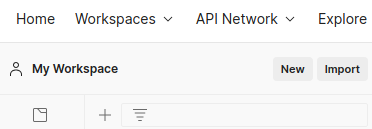
- b.
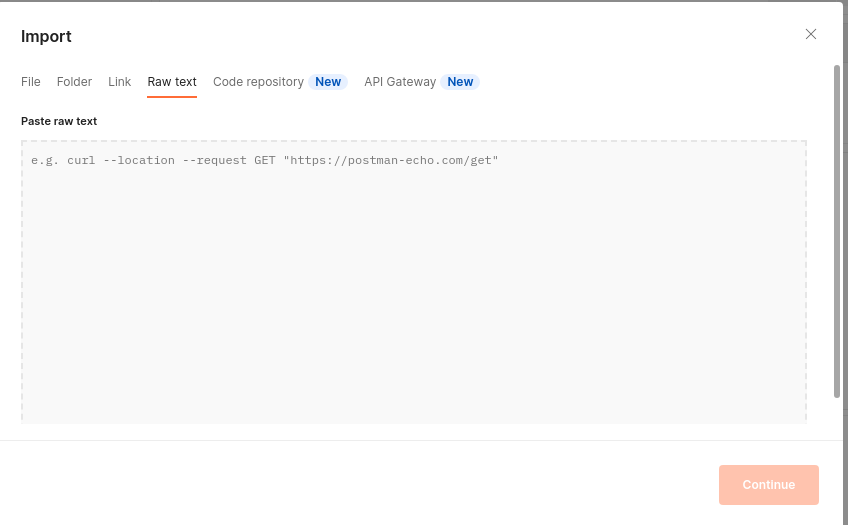
- a.
- Now My Workspace connect to Api finished.


Access Token
web interface: https://d1gix48j5w3eur.cloudfront.net/buying
- Navbar > Sign in using mock account (suggested), if you signup with new user will get default role in basicUser, that mean you NOT allow to access all functions.
- F12 to see element
- select tab >> Application
- Session Storage > http... > access_token and copy these token to postman
- Go to postman and paste token to Authorization > TYPE: Bearer Token >>


[Token] ...
- For auth: UserLevel, need to send “targerUserId” in Params>Path Variables>

KEY: targetUserId VALUE: <targetUserId>
- Email use in web interface for get access token.
- basicUserA
- Email: success+basicUserTest@simulator.amazonses.com
- Password: Abc123456!
- verifiedUserA
- Email: success+verifiedUserTestA@simulator.amazonses.com
- Password: Abc123456!
- verifiedUserB
- Email: success+verifiedUserTestB@simulator.amazonses.com
- Password: Abc123456!
- superUserA
- Email: success+superUserTest@simulator.amazonses.com
- Password: Abc123456!